 MolForma
“4 Input preview”
Shows, read-only, the NWChem input generated from the current molecule, coordinates, calculation settings and advanced settings. It shares the existing input generation and validation, and follows edits, confirming or discarding candidates, Undo/Redo, and loading and saving projects. The input blocks are on the left, the input in the center, and the input summary, checks and path handling on the right. You can also come here with “Check in “4 Input preview”” in “2 Calculation” and with “Show in input” in the advanced settings.
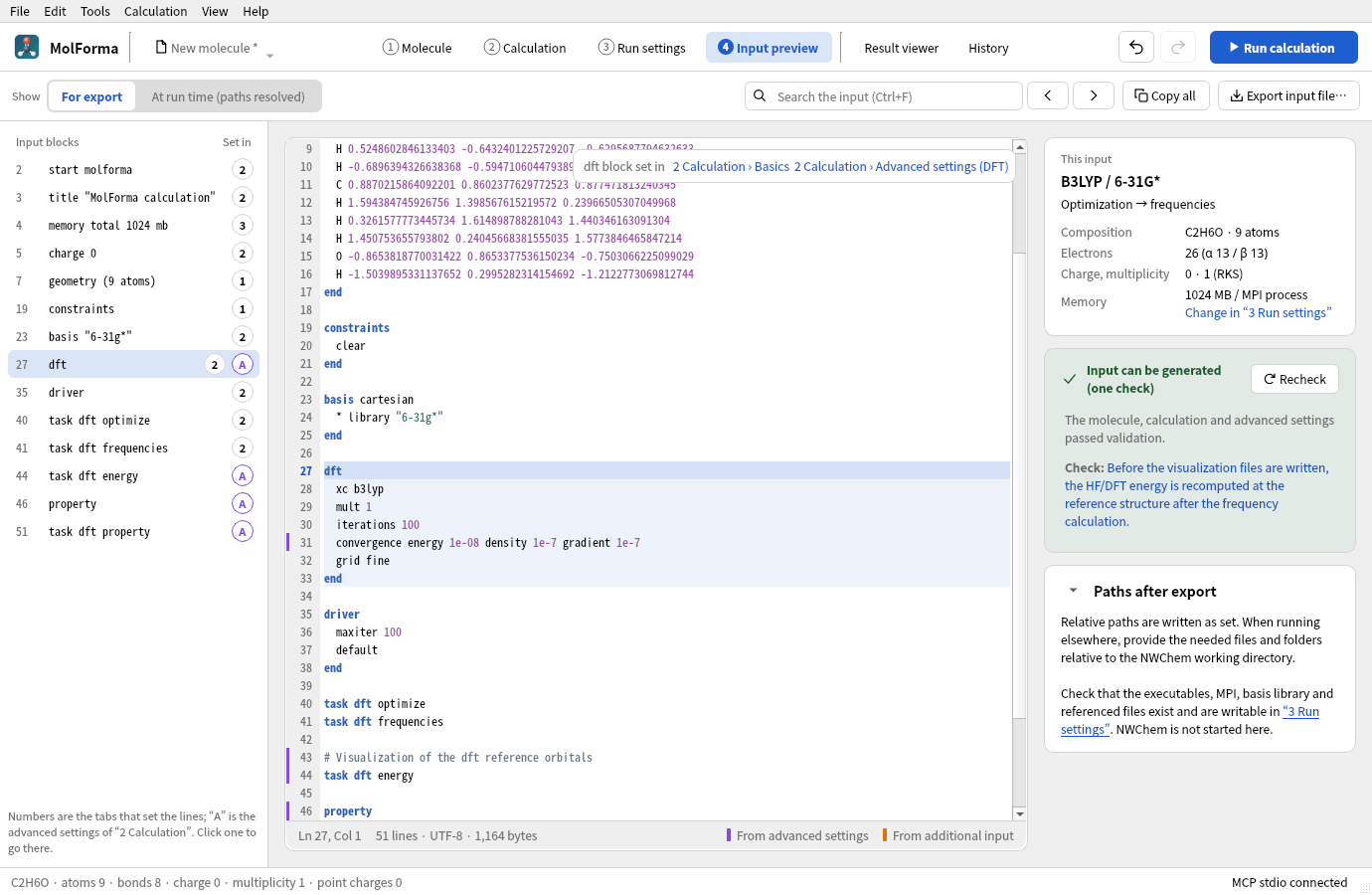
Figure 1 The input for ethanol with the dft block chosen in “Input blocks” on the left. The line from the advanced settings (line 31) has a purple mark, and the upper right shows where the block is set.
| Display mode | Contents |
|---|---|
| Input for export (default) | The same complete input as in “2 Calculation”. Relative paths are written as set |
| Input at run time | The same generation as the complete input saved by “3 Run settings”. Relative input movecs paths are converted to absolute paths from the reference directory |
If the reference directory is blank, the input at run time uses the directory of the saved project, or the app’s working directory for an unsaved project. Relative scratch and permanent paths are relative to the job folder, and output movecs relative to permanent. Output movecs starting with ./ are relative to the job folder. The preview creates no job folder and does not start NWChem. If you export the input at run time on its own and run it elsewhere, create the output subdirectories. “Save as job” creates them.
- “Input blocks” on the left lists the directives and blocks of the input (
start,geometry(atom count),basis,dft, etc.) with their line numbers; choosing one moves to that line. The number (1–3) on each row is the tab that sets that part; pressing it opens that tab (in “2 Calculation”, at that setting). A purple “A” marks a part that comes from the advanced settings; pressing it opens the advanced settings group of that section. - Which lines come from the advanced settings and from the additional input is recorded as the input is generated. Left of the input’s line numbers, lines from the advanced settings get a purple mark and lines of the additional input an orange mark. The block at the cursor gets a colored background, and where it is set (“2 Calculation › Basics”, “2 Calculation › Advanced settings (DFT)”, etc.) is shown as a link at the top right.
- Explicit advanced values are marked even when they equal the default. Each additional-input field appears as one region, with a link to its own field (before tasks or at the end). Repeated identical lines and resolved execution paths keep their own sources.
- Line numbers, coloring of keywords, numbers, strings and comments, the current line and column, and the line and byte counts are shown. Line numbers, colors and marks are not included in the input file.
- Ctrl+F moves to the search field; Enter, “Find next” or “Find previous” searches. Searches are case-insensitive and wrap around at the end and the start. If a recheck leaves the input unchanged, the selection is kept.
- “This input” shows the formula, atom count, method, basis set, task, charge, multiplicity, electron count and memory (the same card as in “2 Calculation”). “Recheck” on the check card checks again what can change outside MolForma, such as referenced files and folders. Links in errors and checks go to the molecule, the calculation settings (the named setting field or advanced settings row) and the run settings. Checks about a numerical Hessian include the line numbers concerned. Pending advanced settings are shown too, but are not included in the input. The “Paths after export” card (“Paths at run time” in the run-time mode) can be folded with the arrow in its heading (when folded, a summary follows the heading), and its state is saved in the app settings.
- On an error the old input is cleared and copying and export are disabled. For a candidate, the input for review is shown and the output buttons stay disabled until it is confirmed or discarded. Nothing can be output during a cleanup either. Right before output, the setting field being edited is committed and the input is checked again.
- “Copy all” and “Export input file…” output the full text of the selected mode.
.nwfiles are UTF-8 with LF line endings, and.nwis added if there is no extension. Exporting alone does not change the project’s save location, edit history or unsaved state.
Checking input generation and checking the run environment are separate. The input for export is not affected by problems in the executable or MPI settings. The run-time mode also checks the types, values and path restrictions of the run settings, but whether the executable, input movecs and basis library exist and whether the job folder is writable are checked in “3 Run settings”. A status saying the input can be generated is not an NWChem syntax check and does not guarantee convergence.
The preview always shows the project being edited. It does not show the frozen copies of running or past calculations; check input.nw in the job folder for those. Loading or directly editing arbitrary NWChem input, importing external edits into the project, and adding arbitrary keywords are not supported.
The input structure, task order and file specifications follow NWChem Getting Started.
Input preview verification
The Qt Test input_preview checks that copying and saving the full text match the generator, that run-time paths match the saved job, that previewing creates no files, preservation of unknown fields and edit history, output control for candidates and errors, Undo/Redo, pending settings, validation links, display of HTML characters, search and block navigation, input blocks and where lines are set (detecting lines from the advanced settings and the additional input, moving to the source tab and advanced settings), committing the focused setting, and the save dialog. Regular CTest needs no NWChem, MPI or network.
On 2026-10-23 the existing 6 suites and the input preview tests passed. 9 input preview tests (including initialization and cleanup), among them output control when a cleanup starts and is cancelled, were also verified with AddressSanitizer, and the screenshots were checked.
The following optional command saves screenshots and test inputs.
QT_QPA_PLATFORM=offscreen MOLFORMA_PREVIEW_ARTIFACTS=/tmp/molforma-preview \
  ./build/test_input_preview focusedSettingAndSaveDialog
See also: “2 Calculation”, Advanced settings and CUBE/MOLDEN output, the list of pages in “Features”.