 MolForma
MCP server overview
--mcp (no window) and --mcp-gui (sharing the document of the launched GUI) provide a native stdio server. It supports the per-request version selection and server/discover of MCP 2026-07-28, the latest stable version as of 2026-10-24, and the initialization of 2025-11-25.
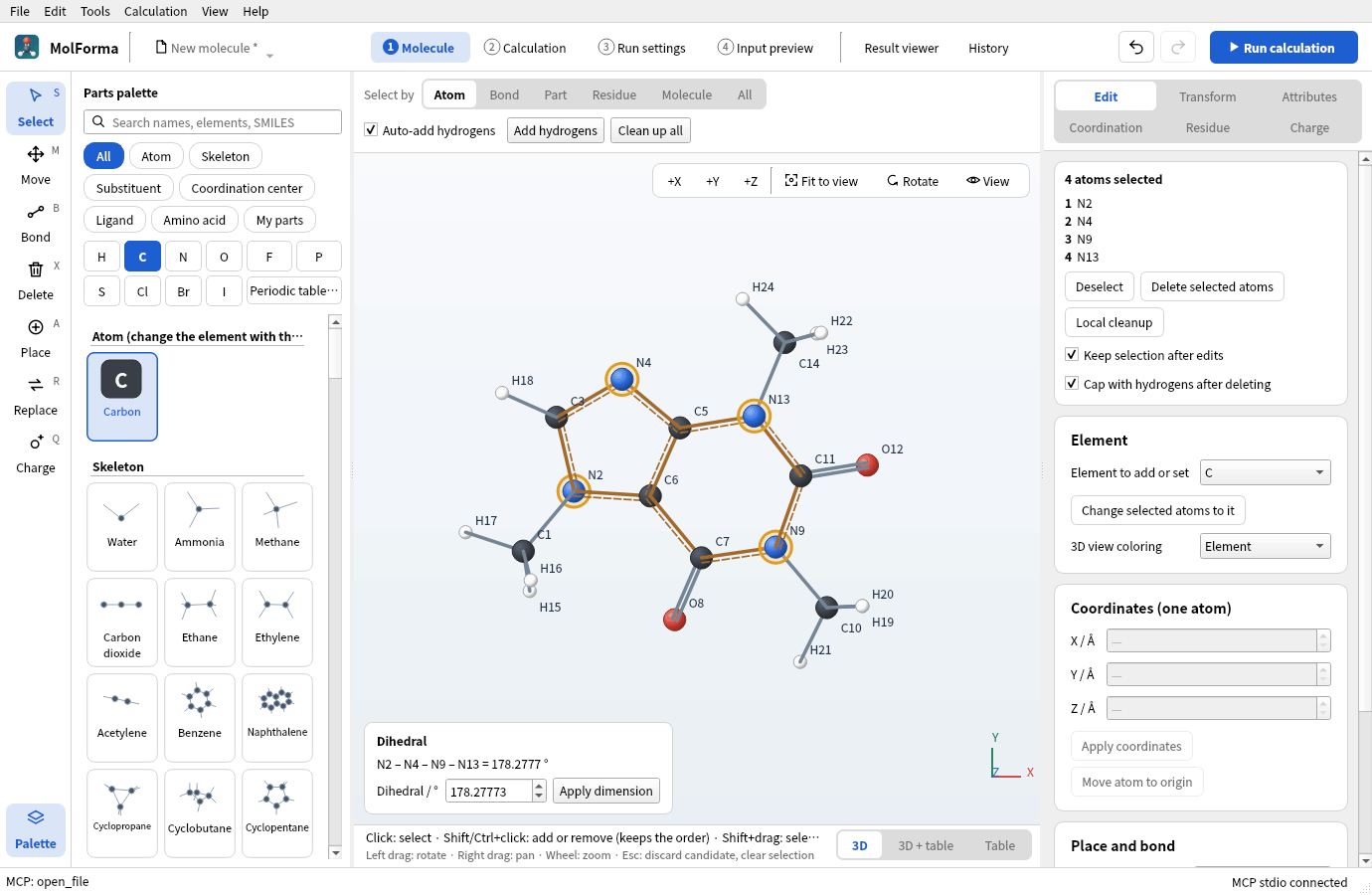
Figure 1 Started with --mcp-gui, an MCP client opened caffeine and chose its nitrogens. The left of the status bar shows the last MCP operation, the right “MCP stdio connected”.
23 common tools expose getting the document and parts, editing atoms, bonds and coordinates, setting dimensions (distance, angle, dihedral), changing atom attributes (element, formal charge, unpaired electrons, isotope, mass, fixed, ghost, atom name), measuring, loading and saving files, confirming and discarding candidates and Undo/Redo, checking and changing NWChem basic, advanced, output and run settings, and generating input. Edits specify the document ID and the content version, and conflicts with changes on the GUI side are refused. Fixed atoms and unknown project fields are protected, and changes are validated before they are added as a candidate or to the history.
--mcp adds 4 calculation and result tools, 27 tools in total. It can run and stop NWChem and save complete inputs, and load, cancel loading of and read result files and calculation folders. Calculations stop when the process exits.
--mcp-gui has 40 tools in total. It exposes SMILES generation, adding fragments, cleanup, conformer search and cancelling them; saving complete NWChem inputs, running and stopping; scanning history, reuse, trash and CSV; loading results, cancelling, and getting structure sequences, orbitals, frequencies and displacements; playing and stopping modes, including imaginary ones, and structure sequences; and getting PNG images. Other existing GUI operations work too: listing widgets, triggering buttons and menus, entering values, selecting tabs, tables and trees, editing cells, and mouse and key input within Qt. Confirmation and file dialogs can be handled over MCP, so no OS-level UI automation is needed.
GUI changes return an operation ID, and messages are accepted while a dialog is open. Editing the document in the background and operations on destroyed widgets are refused. Because the confirmation, candidate and prompt behavior of the GUI carries over, check the completion of an operation and the completion of a calculation or load separately. Result and camera operations do not change the edited document. Only apply_structure of results_action turns the shown result structure into a candidate of the document, which confirm of history confirms.
Claude Code can register it with claude mcp add or a shared .mcp.json, and passes on the desktop environment variables as they are. Version 2.1.310 connects with the new specification and uses the Tasks extension in interactive sessions. See the Claude Code configuration example.
For GUI integration with Codex on Linux, set DISPLAY / WAYLAND_DISPLAY / XDG_RUNTIME_DIR / XAUTHORITY etc. in env_vars to pass on the connection to the desktop. If no display is specified, MolForma writes how to set it to standard error before Qt is initialized and exits. See the Codex configuration example.
Over MCP, the NWChem executable, MPI launcher, extra environment variables and additional calculation input cannot be changed, and calculations started over MCP run only with the values the user set (--mcp-allow-execution-settings lifts this). With --mcp-allow-dir, the places MCP reads and writes are confined to that directory. See Safety restrictions.
The standard error of the calculation (molforma://calculation/stderr) can also be read as a resource. Prompts (4 workflows), Elicitation for the overwrite confirmation of save_file, the Tasks extension (tracking calculations, cleanup, loading and history scans to completion, cancelling with tasks/cancel, answering confirmation dialogs) and resources for the document, calculation output and results are supported. Every tool has a title and an outputSchema. Currently only POSIX stdio is supported. HTTP/Windows transports, subscriptions, Sampling, etc. are not supported. Limits: 8 MiB per received message and per structure file loaded, 10,000 atoms per document, 100 headless Undo steps. Result loading uses the existing limits of the viewer, and GUI and result listings are split into pages of about 40 KiB (up to 2 MiB for a single item). Editing tools return a summary of the change, not the whole document. Closing standard input also ends GUI mode, so save the documents you need before disconnecting. After an update, reconnect the MCP client to pick up added tools. See Connection settings and details.
See also: MCP server (connection settings and the list of tools), the list of pages in “Features”.