 MolForma
Recipe 2 Coordination compounds (trans-[Co(en)₂Cl₂]⁺)
Place a Co coordination center with octahedral geometry and put two bidentate ethylenediamine (en) ligands and two chloride ions on the coordination sites shown as purple numbers. The total charge follows the oxidation number and the ligand charges as you go and ends at +1. Then optimize the structure with B3LYP/def2-SVP.
| What you build | Details |
|---|---|
| Molecule | trans-[Co(en)₂Cl₂]⁺ C₄H₁₆Cl₂CoN₄ (27 atoms, charge +1, singlet) |
| Features | Coordination centers, coordination geometry, center–donor distance and oxidation state, clicking sites, bidentate ligands, placing ligands one after another, the charge following them, Check structure |
| Calculation | B3LYP/def2-SVP, geometry optimization |
| Run time | About 40 minutes (8 MPI processes, 11 steps) |
| Computer | AMD Ryzen 7 2700X (8 cores, 16 threads), 32 GB of memory, NWChem 7.3.1 on Linux |
| Practice data | co_en_complex.molforma.json |
![trans-[Co(en)2Cl2]+ with en and chloride on the coordination sites](../../en/recipes/images/cobalt_complex.png)
1. Place the coordination center
- Start an empty molecule with “File → New”.
- In the parts palette, choose the category “Coordination center” and click “Cobalt”. The tool becomes “Place” and the right side switches to the “Coordination” page.
-
On the “Coordination” page, check that “Coordination geometry” is “Octahedral”, and set “Center–donor / Å” to 2.0 and “Oxidation state (aux.)” to 3.
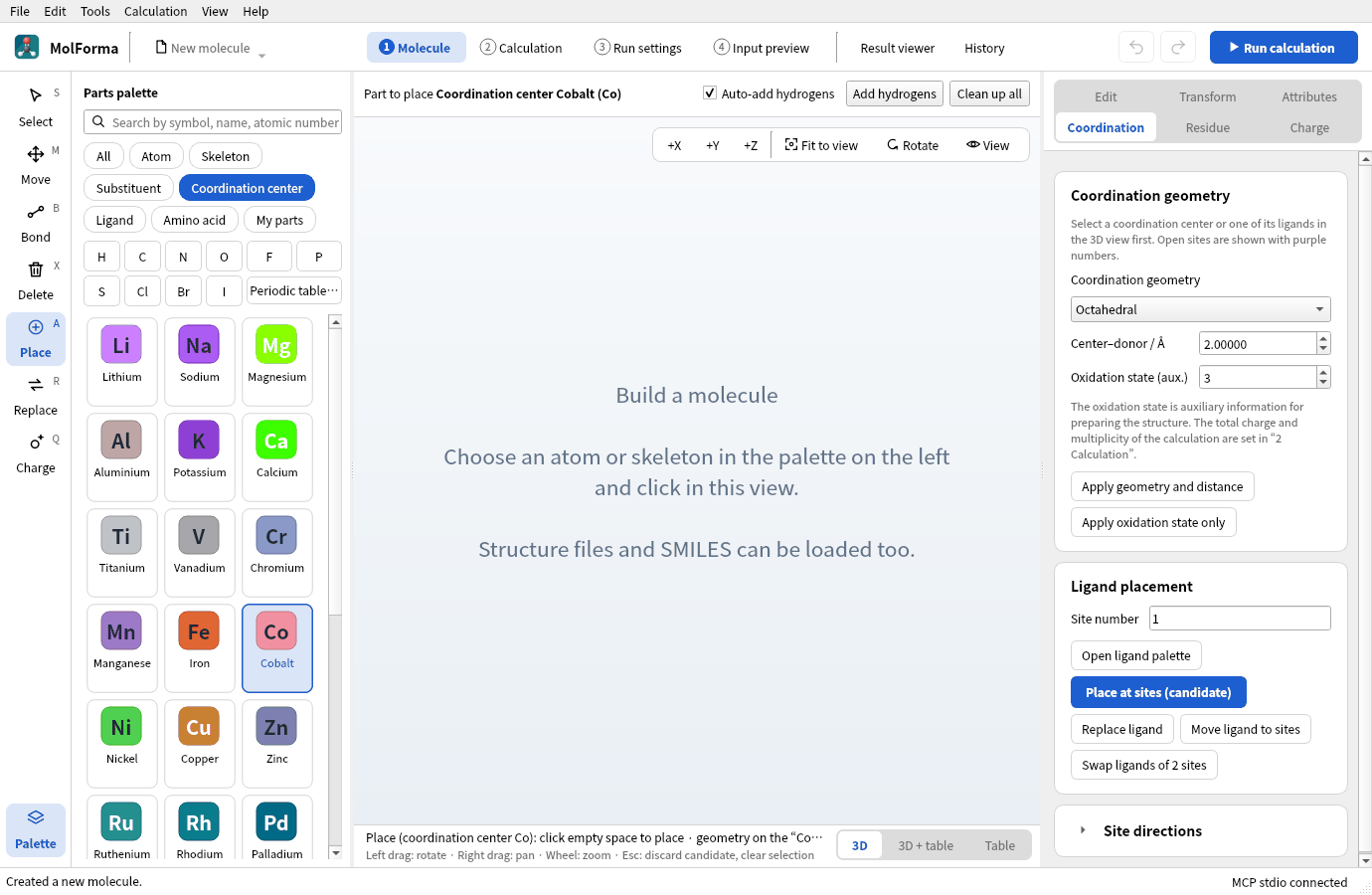
Figure 1 Choosing “Cobalt” in “Coordination center” opens the “Coordination” page on the right, where the geometry, distance and oxidation state are set.
-
Click in empty space in the 3D view. Purple circles mark coordination sites 1–6 around Co. The charge in the status bar becomes 3: the empty molecule’s total charge 0 matched the value its structure suggested (0), so it follows the Co(III) oxidation number.
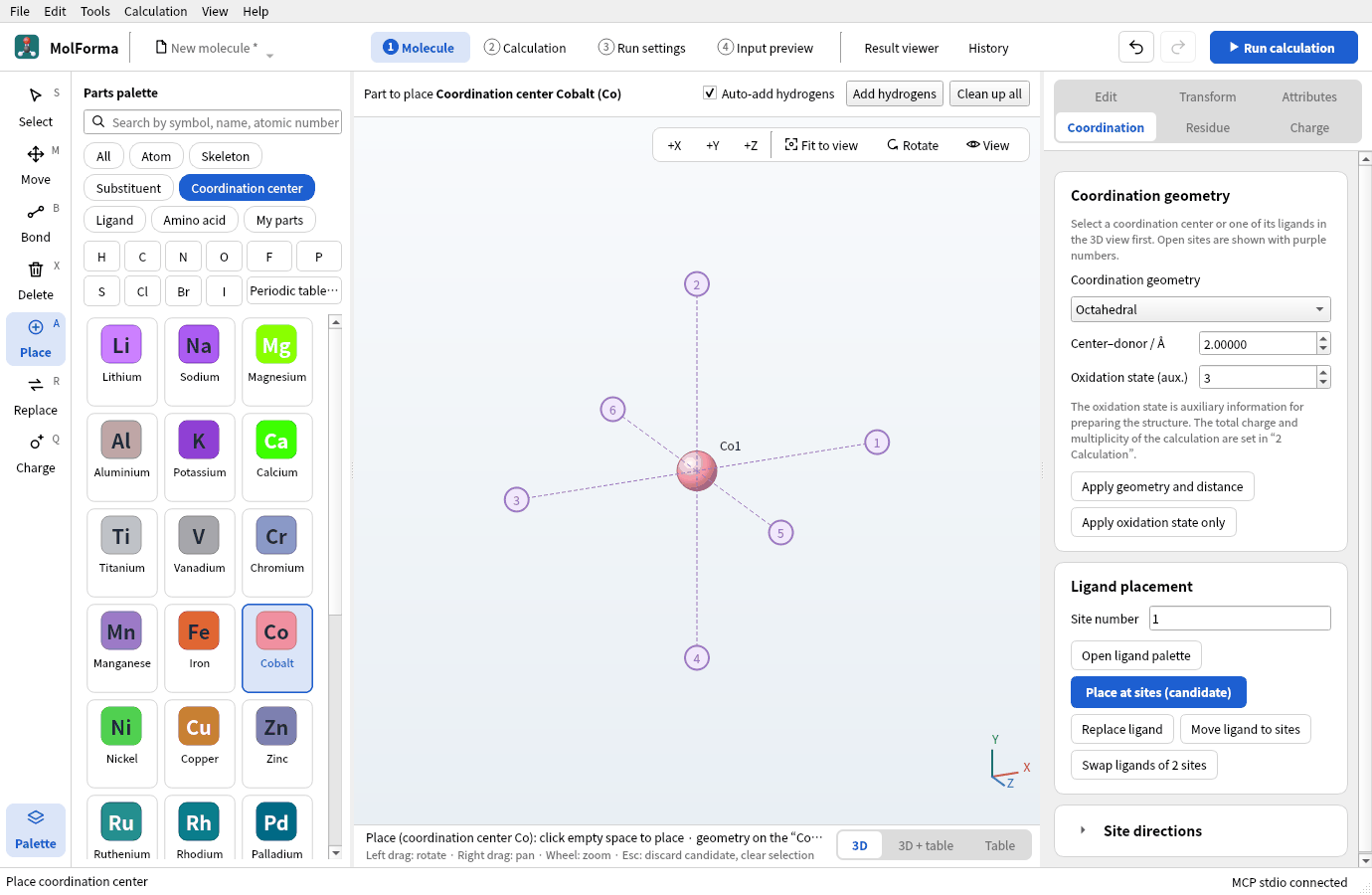
Figure 2 With Co placed, purple numbers mark the coordination sites. The total charge follows the Co(III) oxidation state to 3.
The octahedral sites point to +X (1), +Y (2), −X (3), −Y (4), +Z (5) and −Z (6). Seen from the front (+Z), sites 5 and 6 overlap the center, so they are placed later from the side.
The oxidation number helps prepare the structure; it is not written to the NWChem input. The calculation uses the total charge and multiplicity of “2 Calculation”.
2. Place two ethylenediamines
- Choose the category “Ligand” and click “Ethylenediamine en”.
-
Click purple site 1 and then site 2. A bidentate ligand becomes a candidate once two sites are chosen (“Site number” on the “Coordination” page shows
1,2). Choose neighboring (90°) sites.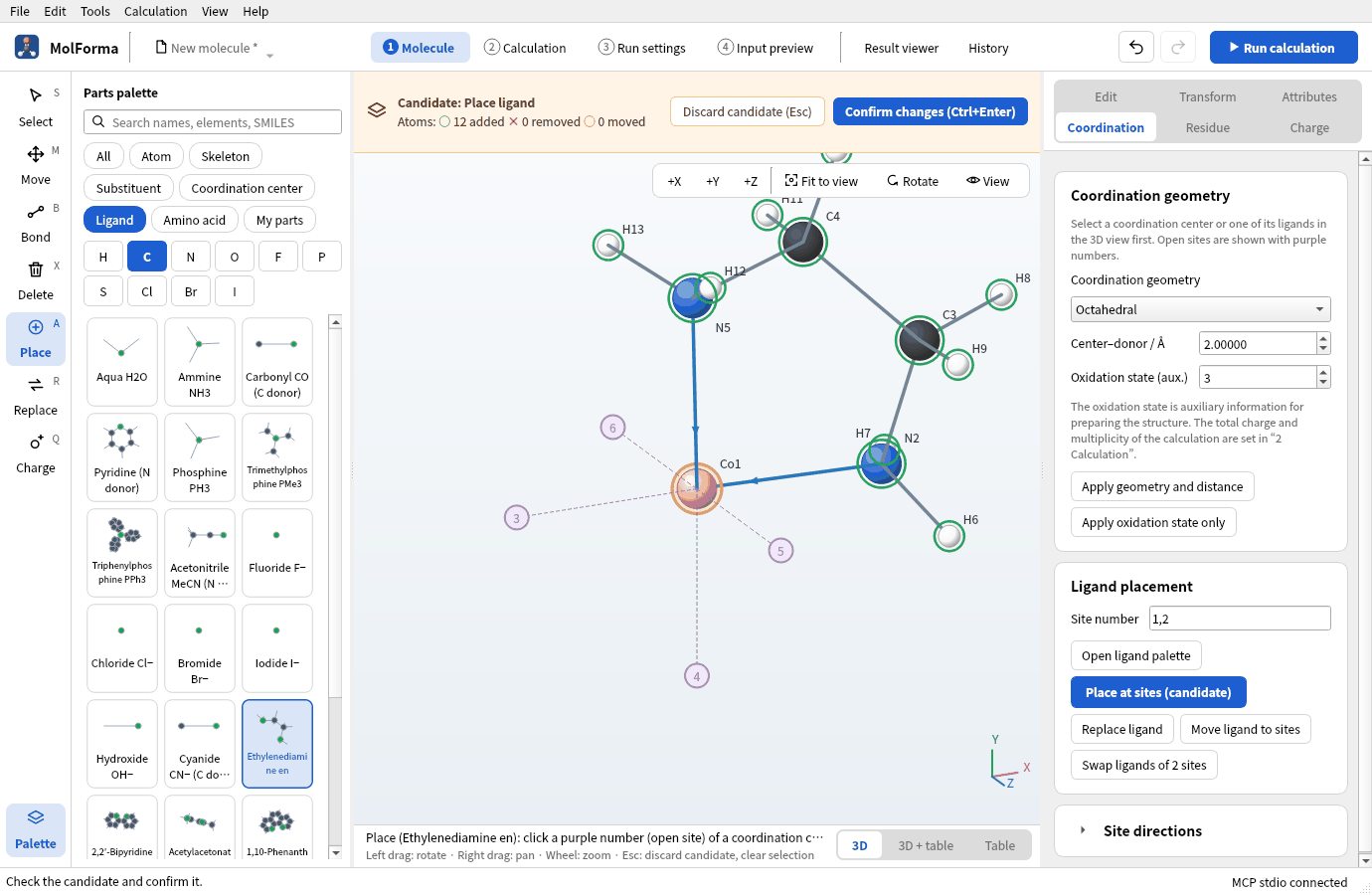
Figure 3 Once two sites are chosen, the bidentate en ligand is placed as a candidate.
- Click site 3 and then site 4. The previous ligand’s candidate is confirmed before the next becomes a candidate (status bar: “Confirmed the previous ligand and made the next one the candidate.”).
-
Press “Confirm changes” (Ctrl+Enter). You have C4H16CoN4 · 25 atoms, charge still 3 (en is neutral).
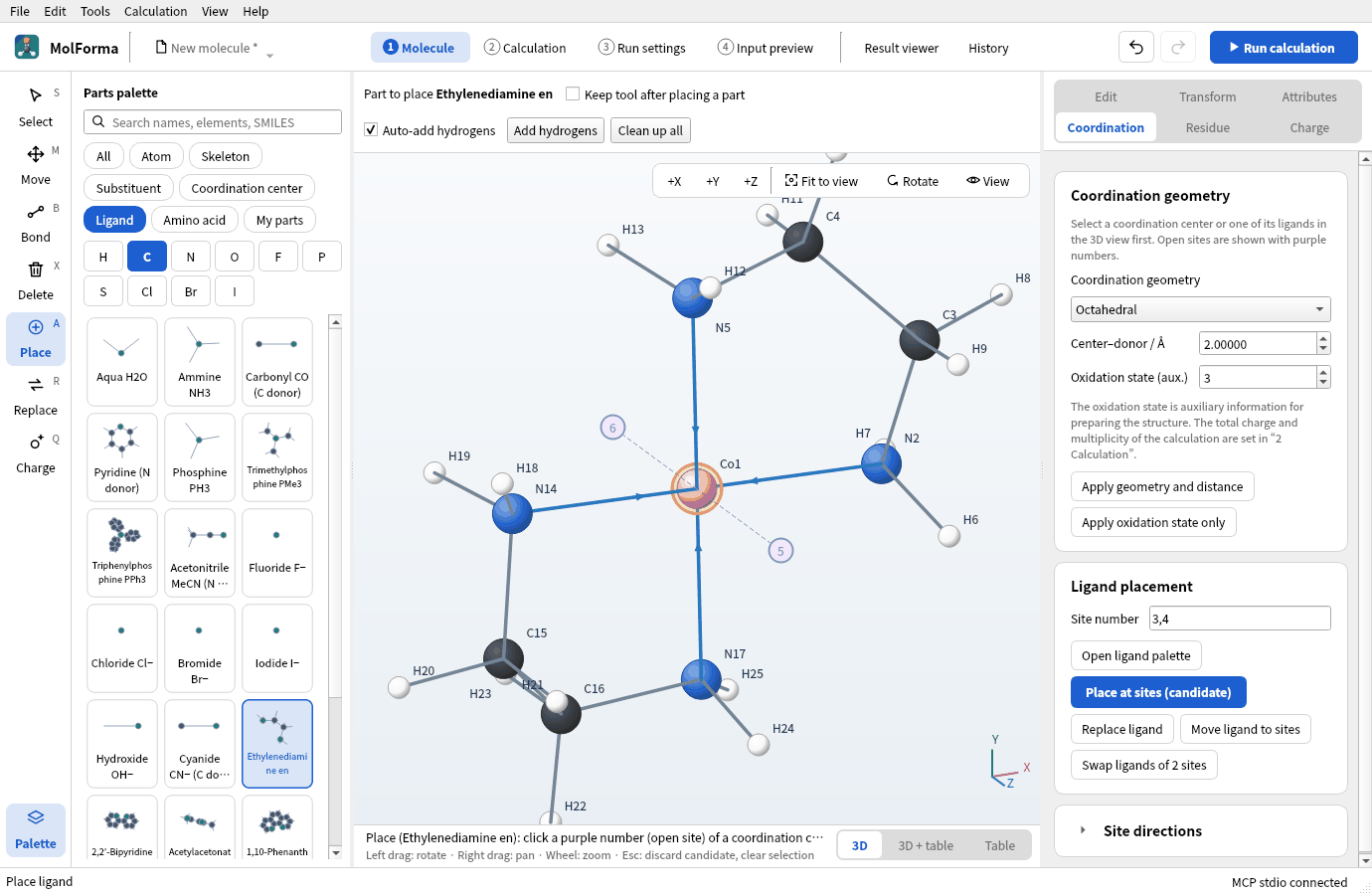
Figure 4 Two en placed and confirmed (C4H16CoN4 · 25 atoms).
3. Put the chlorides on the axis
- Click “Chloride Cl−”.
-
Press “+X” at the top right of the 3D view to look from the side: sites 5 and 6 are now left and right.
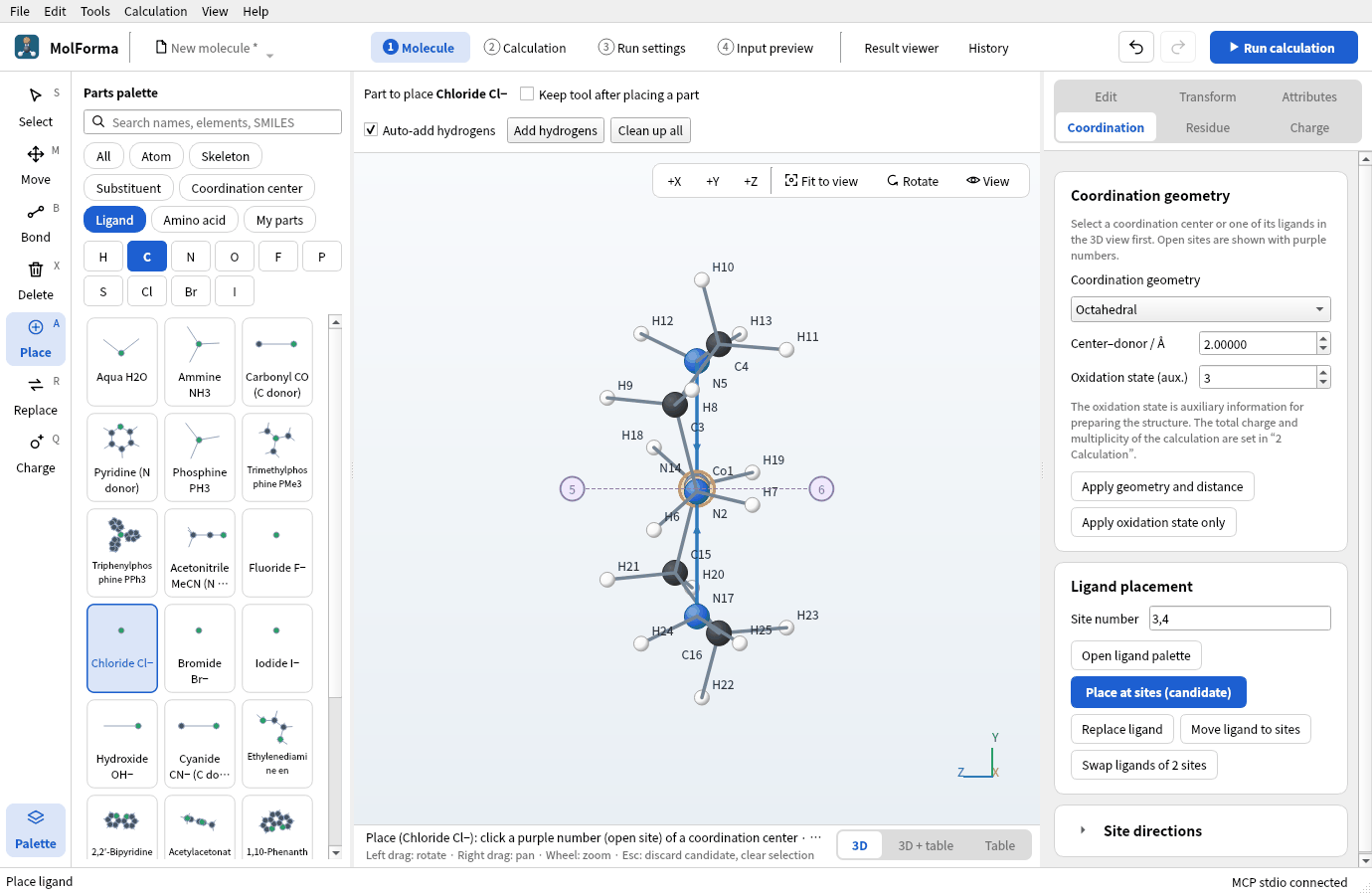
Figure 5 Seen from the side with “+X”, sites 5 and 6 are left and right.
-
Click site 5 and then site 6, and confirm. You get C4H16Cl2CoN4 · 27 atoms, and the charge becomes 3 + 2×(−1) = +1.
![trans-[Co(en)2Cl2]+ with two chlorides on the axis: chlorides Cl26 and Cl27 on both sides of Co](../../en/recipes/images/cobalt_complex/06_complex.png)
Figure 6 With the two chlorides confirmed, the total charge becomes 3 + 2×(−1) = +1.
-
Check that “Tools → Check structure…” says “No problems found.” The “Charge” page shows “Formal charge sum −2 · electrons 128” and “α 64 / β 64”.
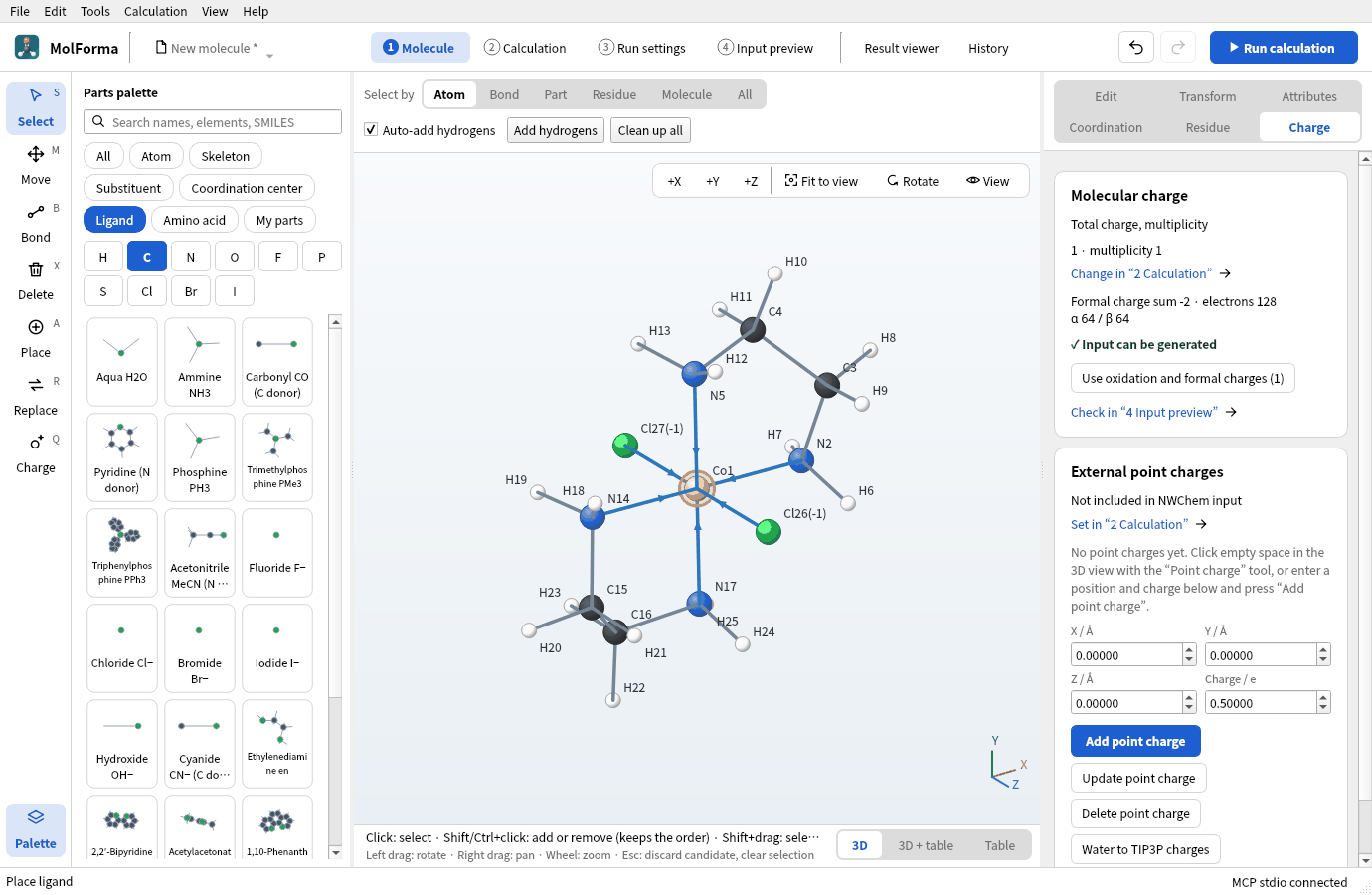
Figure 7 The “Charge” page shows the formal charge sum and the electron count, with a button to use the sum including oxidation states as the total charge.
Chlorides on sites 1 and 2 with en on sites 3 and 5 and on 4 and 6 give the cis isomer. Placed ligands can be changed with “Replace ligand”, “Move ligand to sites” and “Swap ligands of 2 sites” on the “Coordination” page.
Molecules with metals and dative bonds are outside the force field, so “Clean up all” is not available (“Molecules with dative bonds (such as metal complexes) are excluded from force-field cleanup.”). NWChem optimizes the ideal octahedral starting structure.
4. Set up the calculation
-
In “Basics” of “2 Calculation”, set the task to “Geometry optimization”, the method to “DFT” (B3LYP) and the basis set to “def2-SVP”. The def2 sets add ECPs automatically from Rb on; Co is all-electron.
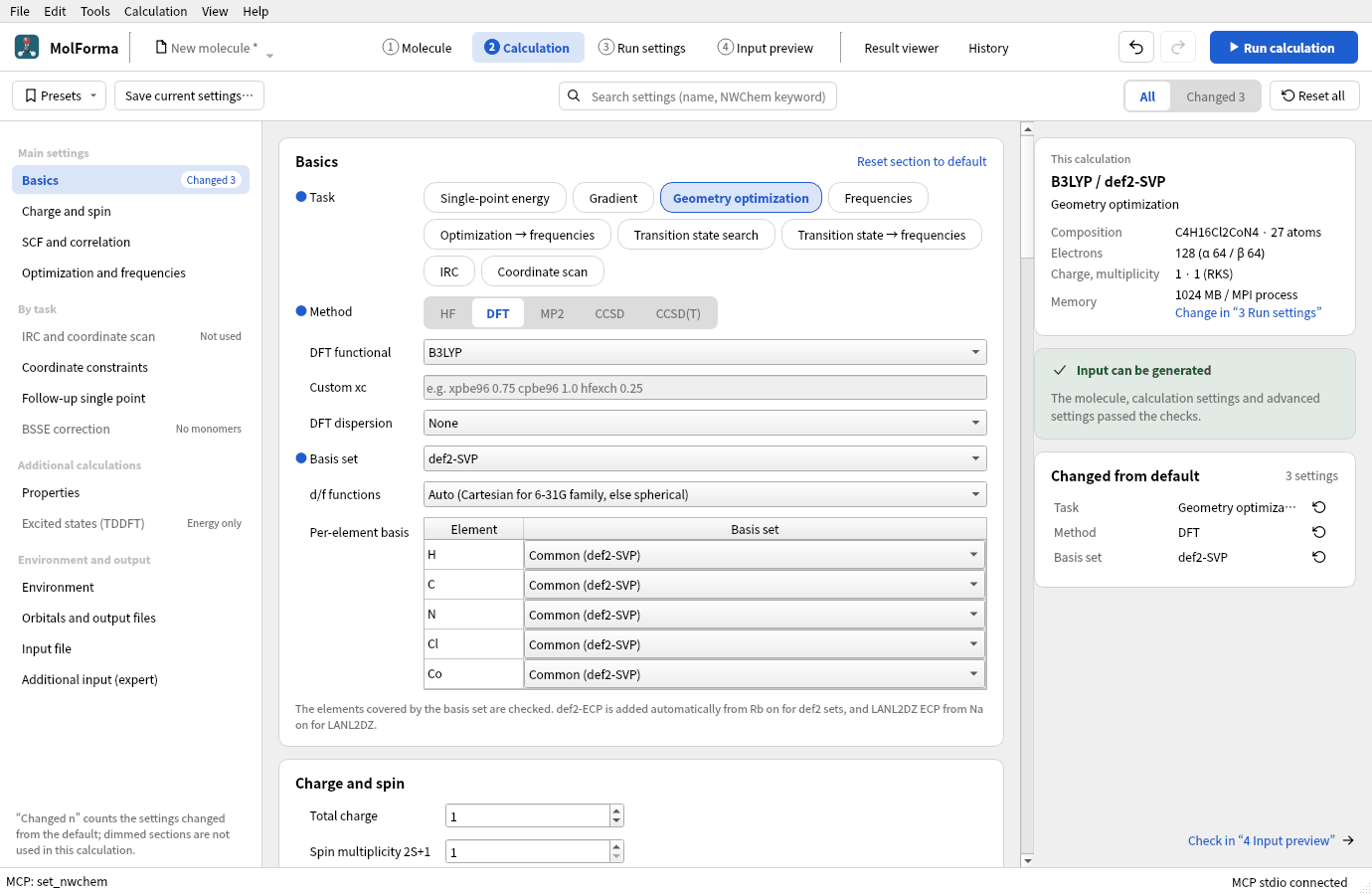
Figure 8 The calculation with def2-SVP. The per-element basis table lists every element, Co included.
- In “Charge and spin”, check total charge 1 and multiplicity 1. Co(III) is low-spin d⁶, a singlet. For other spin states (high spin and so on), change the multiplicity yourself (the reference becomes UKS automatically).
- If the total charge is not +1 (for example, because it was changed by hand before the ligands were placed), press “Use oxidation and formal charges (1)” on the “Charge” page, or “Use the centers’ oxidation numbers and formal charges (1)” in “2 Calculation”.
5. Run and look at the results
Run with “Run calculation” (F5). The run panel shows the energy of each optimization step and the Gmax, Grms, Xmax and Xrms tests.
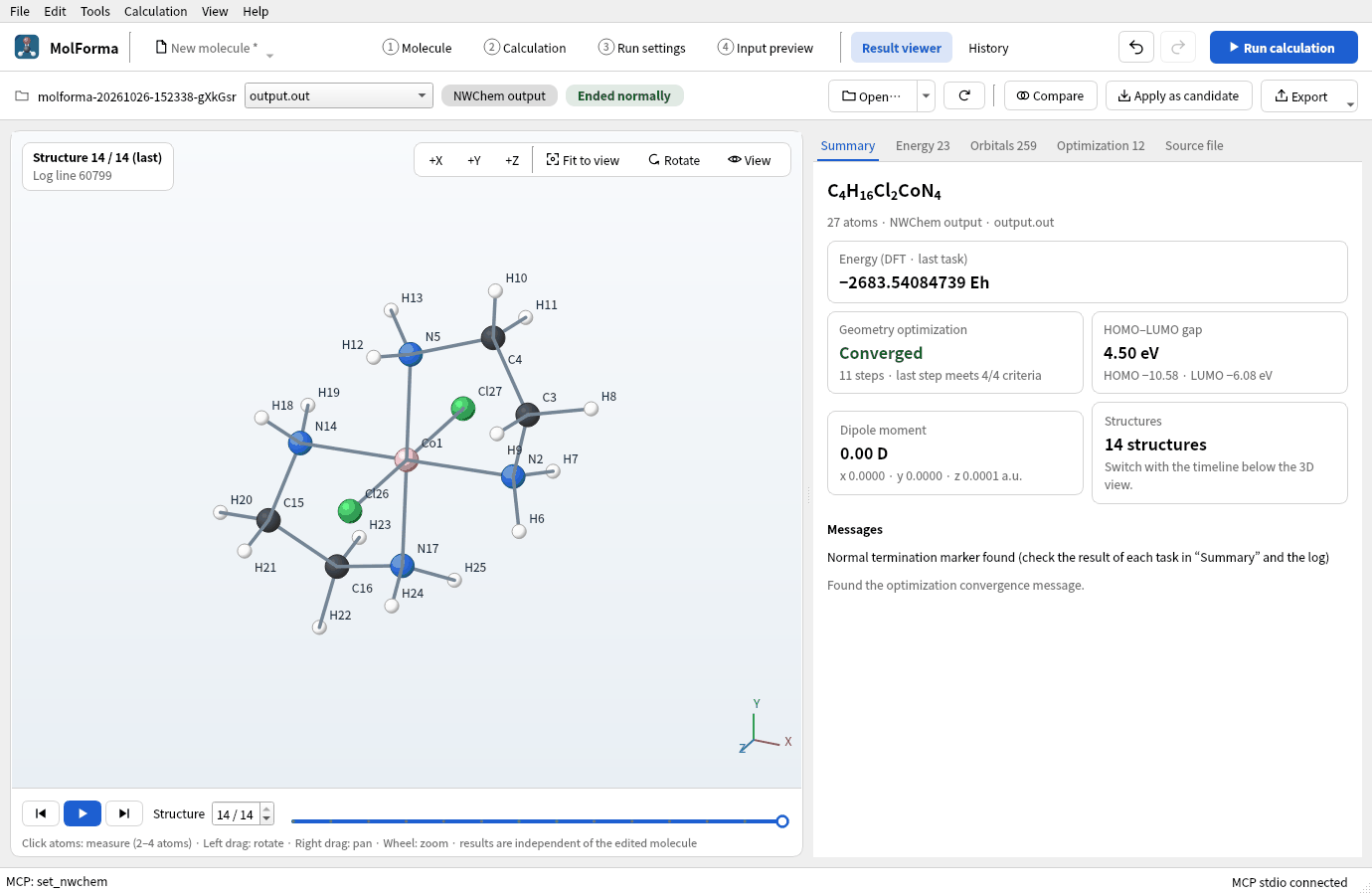
Figure 9 “Summary” of the “Result viewer” after the run.
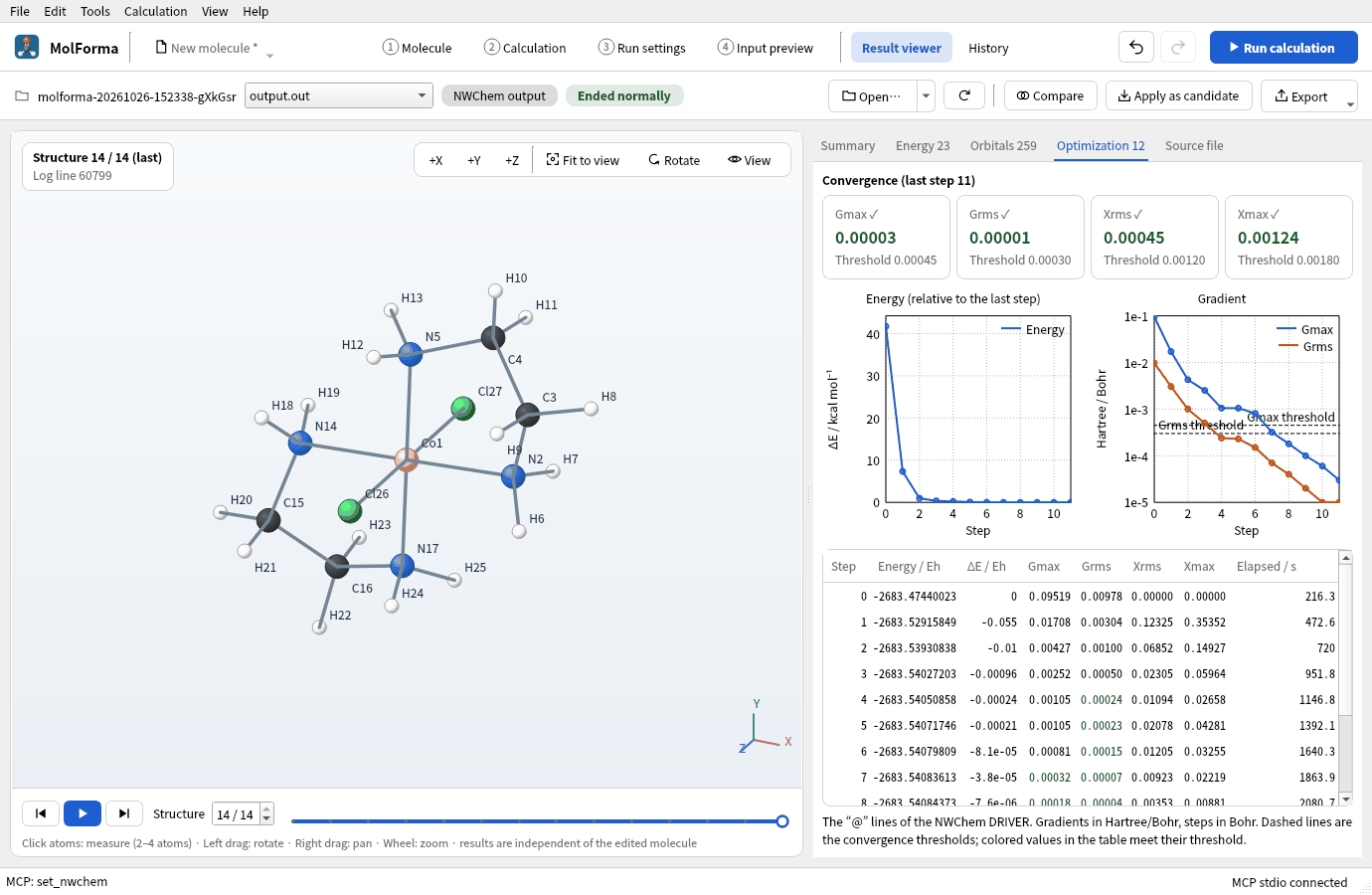
Figure 10 The “Optimization” tab shows how the energy and gradients fall step by step.
Results
| Item | Value |
|---|---|
| Energy of the calculation | −2683.54084739 Eh |
| Optimization | Converged in 11 steps (from Gmax 0.095 of the starting structure) |
| Co–N | 1.987–1.988 Å (start 2.0 Å) |
| Co–Cl | 2.263 Å (start 2.0 Å) |
| Cl–Co–Cl | 180.0° (trans) |
| Dipole moment | 0.00 D (centrosymmetric) |
Click two atoms in turn in the 3D view of the “Result viewer” to see a distance at the bottom left. Bring the optimized structure into “1 Molecule” with “Apply as candidate” to go on to frequencies and other calculations (recipe 14).
Troubleshooting
- Another element than the metal you chose is placedCheck “Place (coordination center Co)” under the 3D view. After a category change, the item highlighted in the palette is placed.
- Clicking a site places no ligandA bidentate ligand becomes a candidate only after two sites. Opposite (180°) sites are refused with “Specify adjacent cis sites for a bidentate ligand.”
- Sites 5 and 6 cannot be seenFrom the front they overlap the center. Turn the view with “+X”, “+Y” or rotation.
- The total charge does not become +1It does not follow if it was changed by hand before the ligands were placed. Set it as in step 4.3.
- Cleanup is refused for structures with metalsBy design. Change the starting distances with “Center–donor” and “Apply geometry and distance” on the “Coordination” page.
See also: Right-side pages of “1 Molecule” (Coordination), recipe 11 Main-group molecules, recipe 12 Solvated clusters and point charges.